
No results for ""

Something went wrong. Please try again.

Affiliate links — we may earn a commission at no extra cost to you. Learn more

UMX logo
Brand

UMX Phones — Find & Compare

7 phones reviewed
Last updated: April 12, 2026

UMX Phone Reviews & Rankings

phones
Sort:
Flip
Flip
UMX · Brew Mobile Platform

No editorial review yet. View full specs →
Camera
Main: 1MP
Flash: No
Performance
Storage: No
Display
Size: 2.2" Color
Battery
Capacity: 800 mAh
Type: Lithium-Ion (Li-Ion)
Removable: Unknown
Talk time: 4h
Design
Weight: 70g
Material: Plastic
Type: Flip
Colors: Black, White, Red, Blue
Fingerprint: Unknown
Waterproof: Unknown
Connectivity
BT: BT 2.1
NFC: Unknown
BT profiles: HFP
USB: Micro-USB 2.0
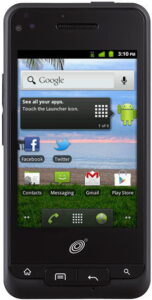
Unimax MAXBravo
Unimax MAXBravo
UMX · Android 2.3 Ginberbread

No editorial review yet. View full specs →
Camera
Main: 3MP
Front: VGA (640 x 480)MP
Video: VGA (640 x 480 pixels)
Flash: No
Features: Auto focus, Effects, Geotagging, White balance
Performance
Chip: Qualcomm MSM7627t
RAM: 512 MB
Storage: No
Speed: 800MHz
Display
Size: 3.2" Color
Res: 320 × 480
PPI: 180 ppi
Multi-touch: Yes
Sensors: Proximity, Motion / Accelerometer, Digital Compass
Battery
Capacity: 1,450 mAh
Type: Lithium-Ion (Li-Ion)
Removable: Yes
Design
Weight: 119g
Material: Plastic
Type: Bar
Colors: Black
Fingerprint: No
Waterproof: Unknown
Connectivity
WiFi: Wi-Fi b/g
BT: BT 2.1
NFC: No
WiFi standards: b, g
BT profiles: A2DP
USB: Micro-USB 2.0
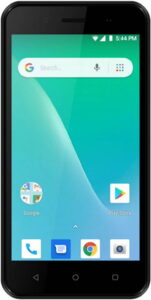
UMX U683CL
UMX U683CL
UMX · Android 9

No editorial review yet. View full specs →

Camera
Main: 2MP
Front: 0.3MP
Flash: Yes (LED)
Features: Effects, Self-timer
Performance
Chip: Qualcomm MSM8909 Quad-core
RAM: 1 GB
Storage: 8 GB
Speed: 1100MHz
Display
Size: 5" Color
Res: 480 × 854
PPI: 196 ppi
Multi-touch: Yes
Sensors: Proximity, Motion / Accelerometer, Digital Compass
Battery
Capacity: 2,000 mAh
Type: Lithium-Ion (Li-Ion)
Removable: Yes
Talk time: 5.2h
Design
Material: Plastic
Type: Bar
Colors: Black
Fingerprint: No
Waterproof: No
Connectivity
WiFi: Wi-Fi b/g/n
BT: BT 4.1
NFC: No
WiFi standards: b, g, n
BT profiles: A2DP, AVRCP, OPP/FTP, HID, HFP, HSP
USB: Micro-USB 2.0
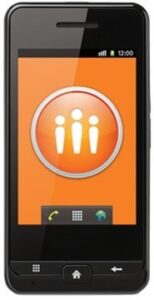
UMX U673C
UMX U673C
UMX · Android 6.0 Marshmallow

No editorial review yet. View full specs →
Camera
Main: 2MP
Front: 0.3MP
Flash: Yes (LED)
Features: Effects, Self-timer
Performance
Chip: Quad-core
RAM: 1 GB
Storage: 8 GB
Speed: 1100MHz
Display
Size: 4" Color
Res: 320 × 533
PPI: 233 ppi
Multi-touch: Yes
Sensors: Ambient Light, Proximity, Motion / Accelerometer, Gyroscope, Digital Compass
Battery
Capacity: 1,650 mAh
Type: Lithium-Ion (Li-Ion)
Removable: Yes
Talk time: 4h
Design
Weight: 4.58g
Material: Plastic
Type: Bar
Colors: Black
Fingerprint: No
Waterproof: No
Connectivity
WiFi: Wi-Fi b/g/n
BT: BT Yes
NFC: No
WiFi standards: b, g, n
BT profiles: A2DP, AVRCP, OPP/FTP, HID, HFP, HSP, PAN
USB: Micro-USB 2.0
UMX Max
UMX Max
UMX · Android 2.3 Gingerbread

No editorial review yet. View full specs →

Camera
Main: 3MP
Flash: No
Features: Auto focus, Effects, Geotagging, White balance
Performance
Chip: Qualcomm QSC6085
RAM: 415 MB
Storage: 158 MB
Speed: 600MHz
Display
Size: 3.2" Color
Res: 320 × 240
Sensors: Proximity, Motion / Accelerometer, Digital Compass
Battery
Capacity: 1,100 mAh
Type: Lithium-Ion (Li-Ion)
Removable: Yes
Design
Weight: 90g
Type: Bar
Colors: Black
Fingerprint: No
Waterproof: Unknown
Connectivity
BT: BT 2.1
NFC: No
BT profiles: A2DP
USB: Yes
Companion
Companion
UMX · Unknown

No editorial review yet. View full specs →

Performance
Chip: Qualcomm QSC6055
Storage: No
Display
Size: 2" Color
Res: 220 × 176
Battery
Capacity: 1,050 mAh
Type: Lithium-Ion (Li-Ion)
Removable: Yes
Talk time: 6.7h
Design
Weight: 95g
Material: Plastic
Type: Bar
Colors: White
Fingerprint: No
Waterproof: Unknown
Connectivity
BT: BT 2.1
NFC: No
BT profiles: HFP
USB: Mini-USB 2.0
Buzz
Buzz
UMX · Brew Mobile Platform 3.1.5

No editorial review yet. View full specs →

Camera
Main: 1MP
Flash: No
Performance
Chip: Qualcomm QSC6055
Storage: No
Display
Size: 2.2" Color
Battery
Capacity: 1,000 mAh
Type: Lithium-Ion (Li-Ion)
Removable: Unknown
Design
Weight: 85g
Type: Bar
Colors: Black, Green, Purple, Red, Blue, Orange
Fingerprint: Unknown
Waterproof: Unknown
Connectivity
BT: BT 2.1
NFC: Unknown
BT profiles: A2DP, HFP
USB: Micro-USB 2.0
Page of · phones
Compare
Compare is full
About the brand

About UMX

Common questions

If your UMX phone shows “Waiting for SMS connection” or won’t send texts, try these solutions in order: Restart your phone. This temporarily fixes the issue for most users. Check your signal strength. Ensure you have adequate cellular network coverage before attempting to send texts. Clear messaging app data. Go to Settings > Apps > Messages > Storage > Clear Cache. This resolves stuck message queues. Contact Assurance Wireless for a tower reset. Call customer support and request a network provisioning refresh. Keep your phone off during this process, then wait 15-20 minutes after powering back on. Factory reset (last resort). Back up your data first. Power off, then press and hold Power + Volume Up until you see “No command.” Press Power + Volume Up briefly to access the menu, select “Wipe data/factory reset” using volume buttons, and confirm with Power button. After setup, contact Assurance Wireless to request another tower reset. This issue is common with UMX phones on Assurance Wireless and typically stems from network provisioning mismatches rather than phone defects. If problems persist after all steps, request a phone replacement from Assurance Wireless.

If you forget your lock screen code on the UMX V351, you have limited recovery options: Try Google Account Recovery First: If prompted on the lock screen, you may be able to unlock using your Google account email and password that’s linked to the device. Factory Reset Option: If account recovery doesn’t work, you’ll need to perform a factory reset through recovery mode: Power off the device completely Press and hold Volume Up/Down + Menu + Power button (or just Volume Up/Down + Power button) Select “Wipe Data/Factory Reset” from the recovery menu Confirm and restart your device Important: A factory reset will permanently erase all data, apps, photos, and settings from your phone. After reset, you’ll need to log in with the Google account previously linked to the device due to Factory Reset Protection (FRP). Best Practice: Back up your data regularly to avoid losing important information if you need to reset your phone.

Quick facts
Founded 2013
Country China
Phones reviewed 7
Contact & support

UMX and related logos are trademarks of their respective owners. PhoneCompass is an independent publication and is not affiliated with or endorsed by UMX. All product names, logos, and brands are the property of their respective owners.

Community

Questions & answers

💬
No questions yet — be the first

Have a question about UMX phones? Ask it here — our community will answer.