
With so many great browsers out there for Android, many users want to experiment and find a personal favorite. Whether you choose the stock browser, Chrome, Firefox, or any other worthy contender, sometimes its not clear how to switch from one to the next. In this guide, we’re going to go over exactly how you can clear all the defaults of your current browser, and show you how to set up an alternative. Now lets get to it.
Instructions
Open up your Settings menu from home screen.
Look for and select Application Manager.
Go to The All Column in the Application Manager.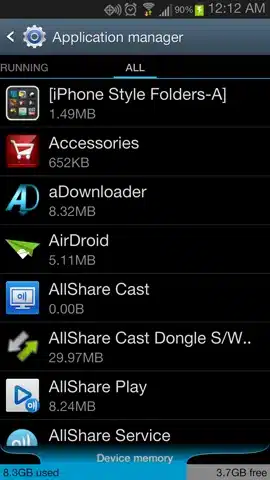
Select the current Browser that you use. In this case we will be selecting the Chrome Browser.
On the App info screen scroll down the screen until you see Launch by default.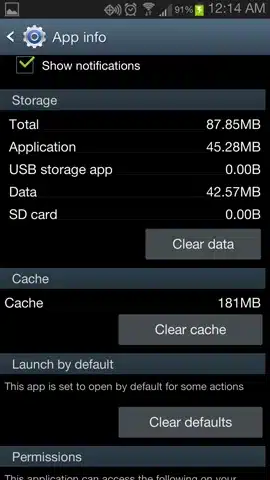
Select Clear defaults. When you Clear defaults you will see the message under the Launch by default header change from “This app is set to open by default for some 6 actions” to”No defaults set”.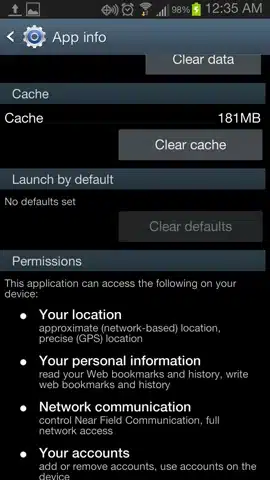
The next time you initiate a web action or link, such as a bookmark widget you see here, a pop up will ask you to choose your default android browser.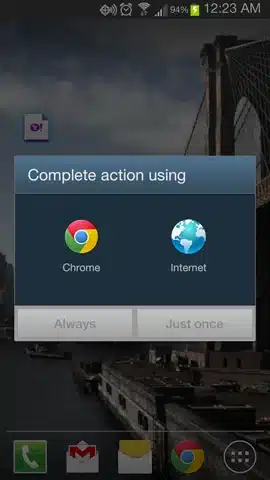
Conclusion
There you have it folks.
While not as easy as toggling your Wi-Fi, changing your default browser is pretty straight forward. Android gives you a lot of flexibility and with so many high quality alternative browsers to choose from, we think you’ll have fun taking advantage of this option.
Tips & Warnings
Remember, any time you designate a program to be default that you no longer want to be default you can go to your Application manager and reset it. This does not just apply to browsers, but for any function that can be carried out by numerous apps, such as your email or music player.


Thank dude