Skip to content
Home…›Guides

How To Re-Install A Deleted BlackBerry App World App

SC
By Scot Cerullo · Published October 22, 2010 · Updated April 16, 2026
If you buy through our links, we may earn a commission - at no extra cost to you. Learn more

If you are deleting an application which you purchased from BlackBerry App World, you can always install it again at no charge. Here’s how:

Highlight and click on the BlackBerry App World icon.

Scroll to and enter “My World” (Bottom right).

Twitter app listing in blackberry app world with four-star rating and free download option

Scroll to and select the app you wish to re-install.
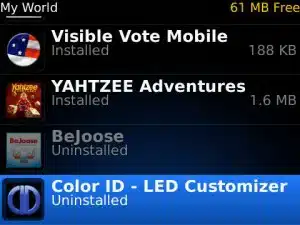
Blackberry app world app list showing installed and uninstalled apps including visible vote mobile, yahtzee adventures, beleuse, and color id

Tips & Warnings

Another way to handle apps that you may not need right now but don’t want to delete is to put them in a folder. This is an easy way to keep them organized and accessible should you decide to use them at another time. See “How To Move and Icon to a Folder on Your BlackBerry” for details.

PhoneCompass Newsletter

New phones, honest scores.

One email when something worth knowing changes. No deal spam, no filler.

By subscribing you agree to receive emails from PhoneCompass. Unsubscribe anytime.

Community

Comments

CA

Hi Faith. I'm sorry but can you tell us what kind of problem you are experiencing?

Carl · 10 years ago ·
FA

What do I do?

faith · 10 years ago ·
JU

Write your comment here...my fone does nt av a blackberry app world. Pls ow do I download it to my curve 8520?

juanny · 10 years ago ·
Leave a comment
Compare is full