


Dell Latitude 10
Key specs
Critic consensus

“The Dell Latitude 10 is a capable Windows 8 tablet that’s hindered by slow internal components and a design that isn’t in balance. Among the growing crop of Atom-based tablets, the Latitude is among the better devices we’ve tested. There are still too many drawbacks to fully recommend it over the ThinkPad Tablet 2, and even that didn’t get a definite thumbs-up. We’re still searching for our dream Windows 8 tablet.”

“Dell's first Windows 8 tablet is an Atom SoC soluton that's aimed primarily at business users thanks to a slew of security options, including TPM, biometrics, SmartCard and encryption software for local and USB drives.”

“With its amazing battery life, durable soft-touch design, bright display and wide array of optional add-ons, the Windows 8-powered Dell Latitude 10 is a versatile business tablet. Just don't expect a good camera or Ultrabook-like performance. This is more of a PC companion than a full-fledged laptop replacement, though you can certainly get real work done on the go (with the optional pen) and on the big screen (with the dock).Among Windows 8 tablets, the Latitude 10 has some pretty stiff competition. The Surface Pro is a lot faster, but ultimately falls flat because of its short battery life. However, the $679 ThinkPad Tablet 2 gives you a place to store its included pen and an optional mobile keyboard dock, making it a better potential laptop replacement. Overall, though, the Dell Latitude 10 has what it takes to satisfy business users who want to go all day on a charge.”

“The Dell Latitude 10 is a Windows 8 tablet whose optional docking station turns it into a fair substitute for a modest desktop system. The additional business-grade features ramp up the value even further. At the same time, though, the price begins to approach that of better-performing hybrids and Ultrabooks.”
Watch before you decide




In Depth
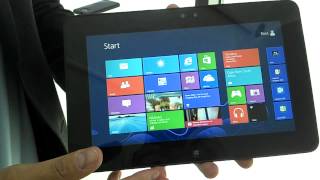
The next wave of consumer-grade tablet computers that will hit the market will be powered by Microsoft’s Windows 8 software. And among them is the business-centric Dell Latitude 10, which features a simple all-black design and comes with a 10.1-inch 1366×768 touchscreen display. It’s very similar to other Windows 8 tablets in terms of specs. But is there anything that sets it apart from the competition?
At the bottom of this tablet, there’s a wide open port that could be mistaken for eSATA or HDMI-out. In reality, this is actually a proprietary port for charging and data that can be used for docking into an accessory for extra functionality. There’s also a full-size USB port on one of its sides, right next to the actual port for HDMI. And at the back, a bunch of obvious markings reveal the location of its most distinguishing feature: a fully removable battery.
Because it’s removable, users can carry around and use as many extra two-cell or four-cell batteries as they like. Underneath the battery is where compatible SIM cards will reside. The fact that the battery can be easily replaced is definitely a boon for productivity. Speaking of which, this tablet won’t be bundled with a keyboard like many other models with Windows 8 Pro. Instead, it can be plugged into an optional dock that gives it four extra USB 2.0 ports and a full-size HDMI port. Dell essentially wants users to bring their own mouse and keyboard.
For it to lack a hardware keyboard is odd since it’s a product that’s supposed to be designed for business use. While users can get wired or wireless keyboards quite easily, that puts it at a disadvantage when compared with devices that already have bundled keyboard docks. The rest of it is built to standard Windows 8 specs: there’s a dual-camera setup, a number of different wireless connectivity options, and support for all existing Windows 7 programs on top of all future modern Windows apps. The removable battery may be a godsend, but more valuable options are available elsewhere.
Need to Know: Dell Latitude 10
1. Comes with a fully removable, user-replaceable battery. (The Good)
2. Runs Microsoft’s Windows 8 Pro software, which makes it compatible with not just modern Windows applications from the Windows Store but also all existing Windows 7 desktop programs. (The Good)
3. Does not come with a bundled keyboard dock for easy typing. (The Bad)
4. Uses a proprietary port for charging and data transfer. (The Bad)
What people actually want to know
When was the Dell Latitude 10 released?
The Dell Latitude 10 was released on December 12, 2012.
How long does the battery last on the Dell Latitude 10?
The Dell Latitude 10 has a 30 mAh battery.
Where can I get support for the Dell Latitude 10?
Visit Dell's official support page for warranty info, repairs, and troubleshooting.
Where can I download the Dell Latitude 10 manual?
You can view and download the Dell Latitude 10 manual on our dedicated manual page.
Questions & answers
Have a question about the Dell Latitude 10? Ask it here and we'll email you as soon as someone answers. Readers have answered 5,000 questions across PhoneCompass.
Finish the security check above to post your question.
Your name shows with your question.
✓ Question submitted. We'll notify you when someone answers.
We sent a verification link to . Click it to publish your question.
Can't find it? Check your spam folder.
How it compares


New phones, honest scores.
One email when something worth knowing changes. No deal spam, no filler.