


ExoPC Slate
Key specs
Critic consensus

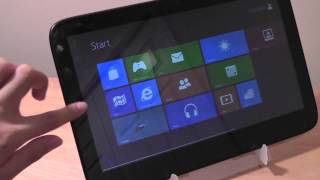
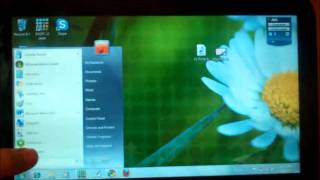
“We've come to look at the ExoPC itself as a bit of a conundrum and perhaps the best illustration yet of exactly why Intel and Microsoft need to do some serious work on their respective tablet offerings. Although ExoPC offers a unique and interesting touch UI on top of Windows 7 to compensate for Microsoft's lacking consumer touch features, it's not anywhere close to done, and thus requires Windows 7 to fully operate. Yet ultimately, it's Windows 7 -- and the power-hungry parts needed to run it -- that end up crippling the ExoPC the most. If it weren't for the promise of the ExoPC software layer, we'd probably write this tablet off like most of the other Win 7 slates we've seen. However, it's hard to overlook the totally unique interface and preloaded applications, as they significantly improve the Windows touch experience in a way that is unmatched by any other Windows tablet we've seen. With that said, $599 is a lot of money to bet on a platform that isn't ready and a piece of hardware that must be plugged into the wall for the better part of the day.”

“It's no secret that Windows 7 is not the best operating system for tablets, mainly because of its mouse-centric heritage. All the Windows-based tablets we've tested suffer from serious usability issues and most have short battery life and high price tags, to boot. The ExoPC Slate is not your typical Win 7 tablet. It covers Microsoft's desktop with an innovative custom interface that includes its own app store. Add in a high-definition 11.6-inch screen, front-facing webcam, and multiple USB ports and you have a tablet that truly stands out from the crowd. But does the ExoPC Slate's uniqueness justify its $599 asking price?”

“If you've been waiting for a usable Windows 7 slate, the ExoPC Slate is close to what you've been waiting for. There are some rough edges (especially in the ExoPC user interface) but the company is busy smoothing them out. It's possible to make a better Windows tablet than the ExoPC Slate, but (unless you're happy with a keyboard you have to fold out the way) no-one has done a better job yet.”

“The ExoPC may be the best Intel Atom-powered Windows tablet I’ve tested to date, thanks to its large, high resolution display, accurate touch panel, HD video accelerator, and custom software layer. But text entry is still a bit of a chore, the custom web browser is a bit too basic for my tastes, and the 2-4 second delay when rotating the display is just too long. For $699, I’d kind of hoped for a better experience. Unfortunately, I think it takes a faster processor and possibly an active digitizer to truly get the most out of Windows 7 on a tablet. Both of those things will be available soon from the Asus Eee Slate EP121, but you’ll have to pony up $999 or more for that model. If there’s one thing I’ve learned from testing the ExoPC, Netbook Navigator Nav9, and CTL 2GoPad SL10, it’s that good Windows tablets still don’t come cheap.”
Watch before you decide









What people actually want to know
When was the ExoPC Slate released?
The ExoPC Slate was released on August 28, 2010.
Does the ExoPC Slate have a headphone jack?
Yes, the ExoPC Slate has a 3.5mm headphone jack.
Where can I download the ExoPC Slate manual?
You can view and download the ExoPC Slate manual on our dedicated manual page.
Questions & answers
Have a question about the ExoPC Slate? Ask it here and we'll email you as soon as someone answers. Readers have answered 5,000 questions across PhoneCompass.
Finish the security check above to post your question.
Your name shows with your question.
✓ Question submitted. We'll notify you when someone answers.
We sent a verification link to . Click it to publish your question.
Can't find it? Check your spam folder.
How it compares


New phones, honest scores.
One email when something worth knowing changes. No deal spam, no filler.