


Viliv S5
Key specs
Critic consensus

“The only reason you should even consider the Viliv S5 Premium is because the best alternative—the OQO model 02—is on its way out. It runs a full-blown operating system and is more pocket-able than a standard netbook. However, the same reason why the model 02 didn't work out will eventually be true of the S5: the virtual haptic keyboard is almost unusable, performance is not up to par. Plus, these days $800 can buy you two netbooks.”

“Priced at $799, our configuration of the Viliv S5 is pricier than the $299 Clarion MiND, and twice as expensive as most netbooks. With that premium, however, comes a highly portable design, GPS, a sharp (though reflective) display, optional 3G connectivity, and impressive endurance. Touch and stylus novices may be put off by the lack of a physical keyboard, but if you want a pocketable PC and don’t mind the two-handed operation—or the price—the Viliv S5 will satisfy.”

“We played with an import model of the Viliv S5 and, while its performance is close to a full-size Netbook, the cost--$599--is at the upper end of the Netbook range. A similarly spec'd 10.1-inch Netbook would only cost $300, half the cost of this device. With the extra cash, you could purchase an iPod Touch for your portable media viewing. For $100 to $200 less, the S5 would be a far more compelling tweener machine, although it's already impressive that Viliv offers this palm-size PC at a fraction of the cost of UMPCs that came before it.”

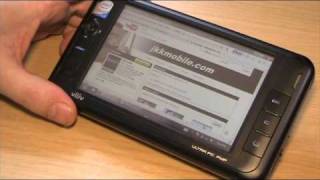
“The S5 is a good value, but you may not like it anyway.At .92lbs, the Viliv is a bit hefty in your hands even though it's 1.5lbs lighter than most netbooks. Still, the Viliv kept surprising me with its speed. Loaded with the same processor as the Vaio P, the system doesn't actually run XP faster than any Atom-based, but to see installation bars and downloads move so quickly on such a tiny device is always a bit of a mindfrak.The resistive touchscreen has passable color, brightness and contrast—luckily, it's also ridiculously accurate. Yeah, the buttons and icons are as minuscule as you'd expect, but I never had a hard time, say, hitting the X to close a window (with my precision nail tool, of course)...unless my browser was full screen. Then my finger just never fit in the corner properly. For when you need extreme precision, the four-way thumbstick doubles as a mouse, or you can use the bundled Cube interface for larger icons.As for the keyboard, it pops up with a conveniently placed button on the right. Pressing keys offers a satisfying moment of haptic feedback. It works about 90% of the time, but however the keyboard skin was designed, your finger press sometimes goes through the keyboard and hits a link or something that's on your screen. It can make typing a simple phrase quite taxing as you unintentionally swap text boxes.The GPS? It works, but you'll need to supply your own nav software (an additional cost). The battery? It's rated at 6 hours, but we received four hours (and two minutes) when tested with nonstop WMV playback (Wi-Fi on with the screen at medium brightness). Since many manufacturers claim battery life that's double actual testing, I considered four hours to be decent.The USB, headphone and Multi I/O ports are enough in a device of this size, because between them, you could plug in a keyboard, monitor (with adapter) and speakers. In this respect, the Viliv could make for an extremely portable home-to-office computer.Here's the issue: I just don't like MIDs. I hate them, really. If I want to use something small, I'll use a smartphone. If I want to use something slightly bigger, that's netbook/laptop territory. The MID, in my mind, is a failed idea of the future still stuck in the 90s. It's a computer that neither fits in your pocket nor serves as your main computer. So if you hate MIDs, the Viliv S5 won't do anything to change that.”
Watch before you decide




What people actually want to know
When was the Viliv S5 released?
The Viliv S5 was released on March 22, 2009.
How long does the battery last on the Viliv S5?
The Viliv S5 has a 24 mAh battery.
Does the Viliv S5 have a headphone jack?
Yes, the Viliv S5 has a 3.5mm headphone jack.
Where can I download the Viliv S5 manual?
You can view and download the Viliv S5 manual on our dedicated manual page.
Questions & answers
Have a question about the Viliv S5? Ask it here and we'll email you as soon as someone answers. Readers have answered 5,000 questions across PhoneCompass.
Finish the security check above to post your question.
Your name shows with your question.
✓ Question submitted. We'll notify you when someone answers.
We sent a verification link to . Click it to publish your question.
Can't find it? Check your spam folder.
How it compares


New phones, honest scores.
One email when something worth knowing changes. No deal spam, no filler.