Samsung i700
Key specs
Watch before you decide


What people say
cannot log calls to saved data and then enter contact info. A basic $29 phone function. Almost impossible to control what you are doing. You lose data at least once a week so don't not put it on the main charger at least twice a day. Phone chargers.....LOL now that is funny
Pro: I has lots of applications and nice big screen Con: It runs slow sometimes The phone is great and you can do different things with the features. It is really helpful when I am out of town. The internet access is great and the windows is easy to learn.
Pro: The many features keeps the phone like new! Con: low battery life I'm am quite the busy bee and haveing this PDA on my hip keeps everything in line and in tune..Being an electronic toy geek at times, this device definately keeps my amazed and its ability to be so many devices in one is just ...
In Depth
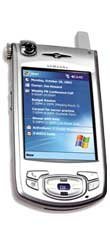
A PDA-phone hybrid with a huge color display and a built-in camera, but no integral keyboard, powered by Miscrosoft’s Pocket PC operating system. Samsung’s designers made the decision to sacrifice a built-in keyboard in favor of an extra-large touch-sensitive display. It’s up to potential users to decide if the trade-off is worth it: can you get used to tapping out messages with a stylus, or training yourself to print so that software can read your writing, or are you too accustomed to the feel of a push-button keypad on your fingertips? One point in the i700’s favor is that the graphic-user interface phone pad is life-sized, so at least fingertip dialing is possible. Another point is that an accessory external keypad is available, made of flexible vinyl. If you have a hard surface in front of you, this could be a good solution for inputting text, but will cost extra.
Except for being too wide to feel natural held to your head, the i700 has better mobile phone features than most mobile phones. Calls can be made by suing the unit as a handset, with a headset, or by speakerphone. What really stands out is the i700’s voice-dialing feature, which uses software from Voice Signal Technologies, and requires no special “training” to work. The i700 also supports SMS.
Compared to the competition, the i700 is superior in processing power, memory, Web browsing and multimedia. For e-mail retrieval, some business users might be better served by the BlackBerry family, but anyone else will be satisfied. The processor is a 300MHz PXA250 XScale Intel, matched with 64MB of RAM. Users have two data storage options: the on-board 4MB SafeStore Flash ROM, or buying a portable Flash memory stick and plugging it into the SD IO slot. Web browsing and multimedia work smoothly thanks to the i700’s combination of hardware and software, although users must note that browsing performance depends as much on their service provider as on the unit. The same rule applies to checking e-mail: while the i700 features full support for Windows e-mail and popular file attachments, including e-mailed photos, users will have to investigate their provider’s service plans and coverage areas. In terms of built-in support for e-mail, the i700 is only surpassed by the BlackBerry line, which supports IBM Lotus accounts as well as Windows.
Easily the most striking feature of the i700 is its brilliant 3.5-inch, 65,000-color TFT display. At present, no other PDA-phone hybrid has a screen this large: this is a true PDA as well as a full-featured mobile phone. Users can adjust brightness through five different settings, although in practice, the default (middle) setting is sufficient for all conditions except direct sunlight. In the sun, the i700’s display washes out quite badly, more noticeably than some of its competitors.
The i700’s built-in 0.3 megapixel camera is one of the unit’s best features, and a real design accomplishment. Located at the top left of the handset in a wheel that can rotate to face toward the user or through a 270-degree arc to point out the back of the unit, it is easy to aim and snap pictures with, and comes with a variety of adjustable settings.
Samsung have done a good job with most of the i700’s miscellaneous features, and the package as it ships comes with lots of high-quality extras. The unit ships with two batteries: a slimline model and an extended-life version. The headset included is stereo, with separate volume controls for each ear and a number of built-in controls: not only is it highly functional, the sound quality is high enough that you won’t need new headphones to use the i700 as an MP3 player (Windows Media Player also comes installed). The SD IO slot will accept Bluetooth cards as well as GPS, Wireless LAN and others. Only one accessory that should have been included is missing: a screen protector, which you will need since most operations use the touch-sensitive screen. Third-party protectors are available, and users are strongly recommended to buy one and protect their investment.
What people actually want to know
When was the Samsung i700 released?
The Samsung i700 was released on December 24, 2003.
Does the Samsung i700 have a headphone jack?
Yes, the Samsung i700 has a 2.5mm headphone jack.
Where can I get support for the Samsung i700?
Visit Samsung's official support page for warranty info, repairs, and troubleshooting.
Questions & answers
Have a question about the Samsung i700? Ask it here and we'll email you as soon as someone answers. Readers have answered 5,000 questions across PhoneCompass.
Finish the security check above to post your question.
Your name shows with your question.
✓ Question submitted. We'll notify you when someone answers.
We sent a verification link to . Click it to publish your question.
Can't find it? Check your spam folder.