


Sonim XP7
Verdict
Key specs
Critic consensus

“Drop an iPhone or a BlackBerry Passport$499.99 at Amazon once, face down, on concrete, and you've cracked the screen. That's what sets tough, clunky smartphones like the XP7 or the Kyocera Brigadier apart from the rest: You don't have to put them in an Otterbox so they can survive your rough-and-tumble lifestyle.The Brigadier and the XP7 are the two rugged smartphones we recommend right now. The XP7 outdoes the Brigadier on ultimate durability, battery life, and extreme speaker volume, with the three-year warranty offering a peace of mind no other phone can match. The Brigadier is less expensive, has a less-scratchable screen and it isn't quite as clunky. Performance on both phones is pretty similar.There are a bunch of new rugged smartphones which we hope to review soon. AT&T just announced the $524.99 Sonim XP6, which shares many of the XP7's excellent qualities (including its warranty), but has a physical keyboard and a smaller screen. Kyocera has the Torque XT on Sprint, and the Duraforce on AT&T. Both are tough and are likely to be less expensive than the XP7, but they just aren't quite as extreme, and they don't have that amazing three-year warranty. Really, if you've ever broken a phone on a work site, that warranty will be reason enough to buy a Sonim.”

“The Sonim XP7 will set you back $650 off-contract, which is certainly very steep for what is essentially a mid-range smartphone in its specifications and features. To justify this price point, you really have to want its rugged features, and even that may not make it compelling enough for most users.All said and done, this smartphone is a very niche product catering to a very specific target audience in mind, so while it may not be for the casual user, if you have a lifestyle that demands this level of ruggedness, this phone could potentially pay for itself in the long run.”

“The Sonim XP7 sits in an entirely different category, aimed at businesses that need reliable performance in the worst conditions. I can certainly manage to find an outlet every few days to keep my gadgets topped up. I don't often need to check my email while wearing snowboarding gloves, caked in mud and dust. And I wouldn't dream of trusting most cell phones to bear sheeting rain and howling winds with gusto while I hurriedly tore down a tent that was obviously built for milder climes. At least, not without worry.”

“Battery life has been absolutely stunning. I actually had to check to make sure everything was running properly because I just couldn't believe there was still plenty of power remaining days after I started using it regularly.”
Watch before you decide








What people say
I have been using my Sonim XP7 with Bell for just over 8 months now. I must say I had issues at first with the stability of the device, after dealing with their support team and one software update later, all my issues are now history. I used to go through 2-3 devices per year (Samsung Rugby, Act...
People can't hear me. Scrambled! Dropped it in six inches of water and it filled the case. Got so mad at it I chucked it to the floor and screen cracked into a spider web. Piece of shi!?,,.,(,::((. Never again. Only good thing is battery life and it's a red neck Brut looking piece of junk!
I bought this phone for the only reason most people have, I have destroyed 8 phones over the last year. I needed something that would stand up to my job - Residential and commercial plumbing. The first phones OS crashed shortly after i bought it and the phone stopped turning on. From day one peop...
In Depth
If your daily routine often involves outdoor adventures or high-impact work environment, you probably leave your sleek and shiny phone at home. It only takes a few drops or bumps to add a phone replacement to the cost of your day.
Sonim thinks they’ve fixed this problem by combining a full-featured smartphone with a rugged design built to handle tough environments. They even offer a three-year warranty with accidental damage coverage!
But if you’ve used a ruggedized phone, you’ve probably experienced the tradeoffs typically involved. Does the Sonim XP7 actually deliver a great phone experience and can it stand up to the durability claims?
Let’s see what the reviews are saying!
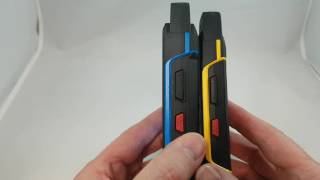
Every review was quick to point out the heft of the phone. The word “brick” was used often. The phone is wrapped in a rubber case with added protection on the corners and hardware buttons in place of the capacitive options on many handsets. PC Magazine notes, “This is not pocket friendly. This phone is designed to be kept in a coat pocket or on a belt clip.”
To put dimension in perspective, at 22mm thick, you could stack two of 2016’s flagship phones on top of each other and still not reach the thickness of the XP7. Phonescoop used the phone for a few days and noted, “I didn’t have any trouble holding or using the phone, but the weight does get to you after prolonged use.”
The rugged design is IP68/IP69 rated for resistance to dirt and dust and submersion in water up to 6 feet for 30 minutes. It achieves part of this through a proprietary magnetic charge port. So don’t expect to use your usual USB cables with this phone. Reviews on the charger were positive, though you might have trouble sourcing a spare if you lose yours.
Coming around the front of the device, you’ll find a 4-inch LCD running at 800-by-480 pixels. Reviews of the screen were average. Android Authority summed up opinions well, saying, “The screen is functional, but in this day and age is quite a poor looking panel. Apart from the low resolution, colors are washed out, with a lot of color shifting when viewing off axis, which doesn’t make for a very good gaming or media consumption experience.”
Keeping things moving at a snappy pace, the phone is powered by a 1.2Ghz Snapdragon 400 processor. While reviews were quick to point out this isn’t a gaming phone, none had any major complaints about performance. PC Magazine said, “Android productivity app performance was decent in my tests, but only decent. High-end games like Beach Buggy Racing have less than optimal frame rates. This is true for all midrange, Snapdragon 400 phones; there’s nothing out of place here.” You’ll also find 16GB of internal storage to bring your favorite apps, movies and music along for the ride.
Part of the reason the phone is so thick and heavy is the 4800mAh battery. As the number suggests, reviews show this leads to some beastly battery life. PC Magazine said, “This is definitely a two-day phone—maybe even three.” ZDNet took their phone for a 12-mile Mudder and declared, “Battery life has been absolutely stunning. I actually had to check to make sure everything was running properly because I just couldn’t believe there was still plenty of power remaining days after I started using it regularly.”
While the phone won’t take pictures you’ll frame and hang, the 8MP rear camera and 1MP front-facing lens received decent reviews. Android Authority tested the camera and said, “The picture quality is just about average in this case, but is certainly better than what I expected and offers a decent amount of color and detail.”
Overall, reviews of the device were positive–though most reviews agreed that this phone serves a specific market. Gigoam said, “For outdoor workers and those with very active lifestyles, I doubt you’ll find a more rugged Android phone than the Sonim XP7.” CNet summed up reviews well, stating, “The XP7 says ‘don’t worry.’ It’s a tool, and can be treated as one. And while it didn’t prove indestructible (glass is glass), it took concentrated buffoonery to wear it down.”
What people actually want to know
Why won't my Sonim XP7 turn on, and what does the faint red LED blinking mean?
A faint red blinking LED on your Sonim XP7 typically indicates a low battery or charging issue. However, if your phone won’t power on even after attempting to charge it, there are several troubleshooting steps you can take before seeking professional repair.
Initial Troubleshooting Steps
- Charge the phone thoroughly. Connect your Sonim XP7 to the original charger and cable for at least 4 hours, or ideally overnight. Some phones with completely drained batteries require extended charging time before they can power on. During charging, you may see the faint red LED continue to blink—this is normal behavior during the charging process.
- Perform a forced reboot. After charging, attempt a forced restart by holding down the Power button for 30 to 60 seconds. Release the button and wait a few seconds to see if the phone powers on. If this doesn’t work, try holding the Power button and Volume Down button together for 30 seconds.
- Check your charger and cable. Test the original charger and cable on another compatible device, or try using a different charger and cable with your Sonim XP7. A faulty charger or damaged USB cable can prevent proper charging and cause misleading battery warning signals, including the red LED indicator.
What the Red LED Means
The faint red blinking LED specifically signals low battery status or an active charging state. If the LED continues to blink after several hours of charging without any response from the power button, this may indicate a deeper issue such as battery failure, a damaged charging port, or a firmware problem.
If the Phone Still Won’t Power On
- Inspect the charging port and battery contacts. Look for any visible debris, corrosion, or damage inside the USB charging port or on the battery contacts. Clean gently with a dry cloth if needed. Damage to these components can prevent charging and cause startup failures.
- Consider battery replacement. If you’ve charged the phone overnight and the forced reboot attempts were unsuccessful, the battery may be defective and unable to hold a charge. A replacement battery from an authorized Sonim dealer may resolve the issue.
- Contact Sonim Support or a professional repair center. If none of the above steps restore power to your phone, professional diagnostics are recommended. Check your device’s warranty status, as repairs may be covered. Sonim support staff can help determine whether your device has a hardware failure, firmware corruption, or other issues requiring specialized repair.
Advanced Option (For Experienced Users Only)
In rare cases where firmware corruption (“bricking”) may be the cause, advanced users can explore firmware recovery through Qualcomm DLOAD mode recovery procedures. This process requires specialized knowledge and tools and should only be attempted by experienced technicians. We recommend consulting official Sonim support documentation or authorized repair centers before attempting this approach.
Next Steps: If you continue to experience issues after following these troubleshooting steps, please visit the official Sonim Support website or contact a certified repair center for further assistance.
Sonim XP7 won't turn on and shows faint red blinking LED - how to fix?
A faint red blinking LED on your Sonim XP7 indicates a critically low or faulty battery. Try these troubleshooting steps:
- Charge for 3-4 hours: Use the original charger and cable. A deeply discharged battery may take longer to respond.
- Try a different charger/cable: Test with another compatible charger to rule out charging equipment failure.
- Force restart: Hold the Power button + Volume Up button together for 30+ seconds, then try powering on normally.
- Check for signs of charging: Look for LED color changes or screen activity after extended charging.
If the phone still won’t turn on: The battery likely needs replacement. A completely dead or damaged battery can prevent the phone from powering on even when plugged in. Contact Sonim support or an authorized repair center for battery replacement or hardware diagnostics.
Prevention tip: Avoid letting the battery drain completely, as this can trigger battery protection circuits that make recharging difficult.
When was the Sonim XP7 released?
The Sonim XP7 was released on October 16, 2014.
How long does the battery last on the Sonim XP7?
The Sonim XP7 has a 4,800 mAh battery.
Is the Sonim XP7 water resistant?
The Sonim XP7 carries an IP68 rating.
Note: water resistance degrades over time and manufacturer warranties typically don't cover liquid damage.
Does the Sonim XP7 support wireless charging?
No, the Sonim XP7 does not support wireless charging.
Does the Sonim XP7 have a headphone jack?
Yes, the Sonim XP7 has a 3.5mm headphone jack.
Does the Sonim XP7 have NFC?
Yes, the Sonim XP7 has NFC. You can use Google Wallet, Apple Pay, and tap-to-pair with Bluetooth accessories.
Where can I get support for the Sonim XP7?
Visit Sonim's official support page for warranty info, repairs, and troubleshooting.
Where can I download the Sonim XP7 manual?
You can view and download the Sonim XP7 manual on our dedicated manual page.
Questions & answers
✓ Question submitted. We'll notify you when someone answers.
We sent a verification link to . Click it to publish your question.
Can't find it? Check your spam folder.
Finish the security check above to post your question.
Your name shows with your question.
How it compares


New phones, honest scores.
One email when something worth knowing changes. No deal spam, no filler.
One of the cures for this is to take the battery out for a minute. Then put it back in. Sometimes this doesn't work the first time. You may want to try it a couple of times if it doesn't work.