


Key specs
Watch before you decide


In Depth
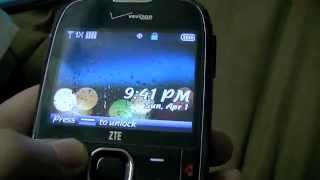
The ZTE Adamant is a relatively simple mobile phone that has a 2.4-inch QVGA display, a 2-megapixel camera with built-in flash, Bluetooth, GPS, and a 3.5mm headphone jack. It also boasts a full QWERTY keyboard for user input, which is sure to make typing easy for both e-mails and text messages. And because it doesn’t have many built-in features, the standard battery on the Adamant lasts for long periods between charges.
If you’re on the lookout for a cheap handset that offers nothing more than the basics, ZTE won’t steer you wrong with the Adamant.
Need to Know: ZTE Adamant
1. Full QWERTY keyboard for user input. (The Good)
2. Battery is long-lasting. (The Good)
3. Keys on the QWERTY keyboard can be quite small for some people. (The Bad)
4. Smallish QVGA screen. (The Bad)
What people actually want to know
When was the ZTE Adamant released?
The ZTE Adamant was released on January 26, 2012.
How long does the battery last on the ZTE Adamant?
The ZTE Adamant has a 1,000 mAh battery.
Does the ZTE Adamant have a headphone jack?
Yes, the ZTE Adamant has a 3.5mm headphone jack.
Where can I download the ZTE Adamant manual?
You can view and download the ZTE Adamant manual on our dedicated manual page.
Questions & answers
✓ Question submitted. We'll notify you when someone answers.
We sent a verification link to . Click it to publish your question.
Can't find it? Check your spam folder.
Finish the security check above to post your question.
Your name shows with your question.


New phones, honest scores.
One email when something worth knowing changes. No deal spam, no filler.
You can use the USB mass storage feature to transfer data between the microSD card and PC.
1. Insert the microSD card into your phone.
2. Connect your phone to the PC with a USB cable.
3. Press the Center Select Key to unlock the phone.
Press the Center Select Key [MENU] > Settings & Tools > Tools > USB Mass Storage.
4. The phone will be in USB mode and you can transfer data between the microSD card and PC.
5. If you want to exit from the USB mode, press the Center Select Key [EXIT].
I got this information from page 99 and 100 of the user manual. If you don't have a copy of the manual yet, you can download it from the ZTE Adamant page.