


Samsung Galaxy TabPro S
Verdict
Key specs
Critic consensus

“Samsung's screen is absolutely gorgeous, and I really and truly want to live in an OLED future. But I can't imagine using a machine that so aggressively makes you aware of its imminent demise. Every moment I used that gorgeous screen, I was all too aware that it was deteriorating and that things like the Windows logo on the taskbar were doing irreparable harm.”

“The Samsung Galaxy TabPro S doesn't do everything right, but its few missteps are in service of a greater good -- providing a top-notch Windows tablet experience at a reasonable price. The overall value here is excellent, especially considering the advanced display and very long battery life.”

“The TabPro S offers a vibrant Super AMOLED display and decent performance for less than a grand, with the best battery life of any detachable we've tested this year. However, this hybrid is a better tablet than it is a laptop, because of its shallow keyboard and a display that can wobble in your lap. Plus, you'll have to be willing to sacrifice a full-size USB port and memory card slot.”

“Overall, Samsung's first bash at a laptop-replacement tablet gets plenty of things right. It runs full Windows 10, lasts for a full working day, has a bright and colourful screen (although it's not class-leading in terms of resolution), and a solid design compared to Samsung tablets of old.”
Watch before you decide


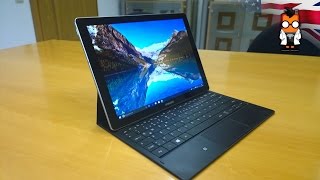


In Depth
When you think of Samsung, you probably think of their flagship line of mobile phones and tablets. With the Galaxy TabPro S, the Galaxy series transitions to the world of Windows. The specs on paper look solid, but does the real-life performance and experience of this new hybrid tablet stack up? Let’s see what the reviews are saying!
Across the board, reviewers were impressed with the design of the TabPro S. Combining a matte-finish plastic case with shiny metal trim and the sleek Samsung aesthetic, most reviewers noted it felt as good, if not better, than any Samsung Galaxy flagship they’ve used. Even with the included keyboard case, the hybrid also comes in thinner than most of the competition at the time of writing. At just over 1.5lbs, this tablet/laptop mash-up is ready to hit the road without weighing you down. The Inquirer took their test model around town for a few days and proclaimed, “
The device proved itself a robust piece of kit despite measuring just 6.3mm thick.”
One area where reviewers were less happy with the design was Samsung’s choice to include only a single USB-C port and a 3.5mm jack. If you’re looking to connect older devices, or use a thumb drive while charging, you’ll need to pick up an adapter.
Heading around to the front of the tablet, you’ll find what most reviews agree is the star of the show–a 12-inch 2160-by-1440 Super AMOLED display. Alphr states, “You’d be hard pushed to find a better display on a device this size, be it a tablet, laptop or convertible.” Much like the displays in their mobile phones, the AMOLED tech from Samsung in the TabPro S offers increased contrast, deep blacks and rich color.
However, a few reviews pointed out how annoyed they were about the screen dimming after a minute of idling. Ars Technica highlighted a reason for this–AMOLED displays degrade over time. The more the display is used, the weaker the image becomes. If you’re looking for a long-term investment, only time will tell how long the screen will keep it’s awesome quality. Ars Technica is a bit more skeptical than many reviewers, saying, “One day, perhaps in the not too distant future, that beautiful screen is going to be ruined.”
Unlike many of Samsung’s previous tablets, the TabPro S is running a full-featured version of WIndows 10 Home. This means you can access the same email apps, productivity tools and media streaming options as you would at the home or office. Powering the hybrid, you’ll find a 2.2Ghz dual-core Intel Core M processor and 4GB of RAM. Reviews were wholly positive in terms of both performance. The Inquirer noted that the fanless processor offers, “an impressively silent experience, even when carrying out performance-intensive tasks.”
While most reviews were happy with performance, they were all quick to point out that is a light-duty and productivity device. Try loading up the latest games or rendering video and you’re likely to be disappointed. One area of contention among reviewers was the amount of RAM. While 4GB is plenty for basic usage, The Next Web noted, “While it rarely slowed down, Chrome and Edge did reload tabs frequently when things got really busy – this is not a machine for you if you need to have 30 tabs open at any given time.”
If you’re planning to snap pictures, video chat or scan documents using your tablet, the TabPro S includes 5+ MP front and rear-facing cameras. You’ll also find 128GB of SATA storage on-board to store your apps, media and other essentials.
Adding to the portability of the hybrid, you’ll find a 5,200mAh internal battery. Reviewers found that Samsung’s 10-hour battery life claim was fairly accurate. Mobile Syrup used their test model to work for a day and found, “The device lasted 13 hours before shutting off, much over a full work day.” PC World pushed the limits further–looping 4K video–and found, “The TabPro S gave us almost nine hours of playback.”
To help it bridge the gap between tablet and laptop, the TabPro S includes a keyboard and leather protective case. The keyboard also doubles as a stand, offering an upright and reclined angle depending on your needs.
Unlike many of its competitors, the TabPro S comes with the keyboard at no additional charge. Unfortunately, the reviews of the keyboard are all over the map. The Next Web was fairly positive, saying, “The typing experience is decent for a keyboard this thin, but not great in the grand scheme.” However, most reviews noted issues with adjusting to the cramped keyboard and described the keys as mushy. The trackpad didn’t fare much better. Ars Technica was perhaps the most critical, saying, “If you’re tempted to pick it up laptop style, by grasping the keyboard with the screen still open, the whole thing bends.”
Overall, reviews of the TabPro S were positive. The hybrid appears to have minor issues with the keyboard and a lack of connectivity options, but otherwise functions as well as the specs hint it might. PC World highlights this in their summary of the device, calling it, “An awesome little convertible, even with the keyboard’s drawbacks and the curious screen-dimming behavior.”
The Next Web sums up opinions well, saying, “The TabPro S is the best Windows tablet at being ‘just a tablet’ so far – and it’s not too shabby as an actual computer, too.”
What people actually want to know
When was the Samsung Galaxy TabPro S released?
The Samsung Galaxy TabPro S was released on February 28, 2016.
How long does the battery last on the Samsung Galaxy TabPro S?
The Samsung Galaxy TabPro S has a 5,200 mAh battery.
Does the Samsung Galaxy TabPro S support wireless charging?
No, the Samsung Galaxy TabPro S does not support wireless charging.
Does the Samsung Galaxy TabPro S have a headphone jack?
Yes, the Samsung Galaxy TabPro S has a 3.5mm headphone jack.
Does the Samsung Galaxy TabPro S have NFC?
Yes, the Samsung Galaxy TabPro S has NFC. You can use Google Wallet, Apple Pay, and tap-to-pair with Bluetooth accessories.
Where can I get support for the Samsung Galaxy TabPro S?
Visit Samsung's official support page for warranty info, repairs, and troubleshooting.
Where can I download the Samsung Galaxy TabPro S manual?
You can view and download the Samsung Galaxy TabPro S manual on our dedicated manual page.
Questions & answers
Have a question about the Samsung Galaxy TabPro S? Ask it here and we'll email you as soon as someone answers. Readers have answered 5,000 questions across PhoneCompass.
Finish the security check above to post your question.
Your name shows with your question.
✓ Question submitted. We'll notify you when someone answers.
We sent a verification link to . Click it to publish your question.
Can't find it? Check your spam folder.
How it compares


New phones, honest scores.
One email when something worth knowing changes. No deal spam, no filler.