


CAT S60
Verdict
Key specs
Critic consensus

“The Cat S60 tops its next-closest competitor, the Samsung Galaxy S7 Active, in almost every way. It's more durable, has a brighter screen, lasts longer on a charge and looks better. At $599, the S60 is cheaper, too. And that's before you even talk about its built-in thermal camera.”

“The Cat S60 not the best-performing rugged phone that’s currently on the market — the Samsung Galaxy S7 Active has better specs across the board, a far better screen, a fingerprint reader, and the company’s industry-leading camera tech. But the S7 Active's ruggedness isn’t quite as robust, and it definitely doesn’t have a thermal camera.”

“Should you buy the Cat S60? Almost certainly not. This is not a phone for the average consumer, but I could see businesses buying them for employees. Almost every contractor I've dealt with was carrying some sort of smartphone in a giant ruggedized case, but the Cat S60 doesn't really need a case. It also has a huge battery and the built-in thermal camera, which could be of great value in a lot of fields. I've had immense fun playing with the S60's FLIR camera, though I don't personally have a lot of use for it on a regular basis (at least not serious ones). It simply would not make sense for me to carry this phone, and I'm sure most of you are in the same boat.”

“The Cat S60's thoughtfully executed design puts functionality and durability at the forefront. The fact that it's made to work under distressing conditions -- ones that would literally break most phones -- makes it perfect for anyone who works in a precarious environment or has a very active, outdoorsy lifestyle. That said, it's not worth it for someone, like me -- who does none of those things -- to lug around and use everyday.”
Watch before you decide

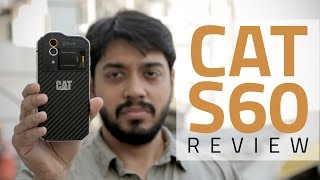



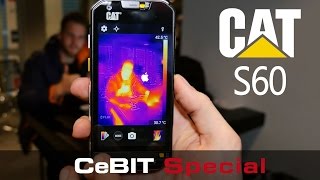


In Depth
Rugged phones are gaining popularity. After all, when you’re dropping hundreds on a phone, you should be able to use it at work. The Cat S60 promises outstanding durability and a feature no one else currently has–thermal imaging. But does the phone sacrifice too much to provide durability as many models do?
Let’s see what reviewers are saying!
Every review available mentioned how heavy the phone felt. This is due to its rugged stainless steel and carbon fiber chassis and the monster-sized battery. The phone is rated to survive falls from up to 6 feet as well as submersion in up to 5 meters of water. It’s good for temperatures ranging from -13F to 132F.
Android Police put these claims to the test and said, “There isn’t the tiniest bit of flex or creaking in the case. I have no doubt that if it became necessary, I could kill a man with the Cat S60. This phone looks and feels like a tool, a piece of equipment that doesn’t need to be babied.”
Around front, you’ll find a 4.7-inch 720p display. The glass is treated for use underwater, with wet hands or when wearing gloves. Overall, reviews were decent. Everyone applauded how bright and dim the screen could be. Pixel density isn’t stellar, but it’s not so low to have pixels popping out in images or text. Android Police noted, “The viewing angles aren’t ideal. There’s noticeable dimming at off-angles.”
With a Snapdragon 617 processor and 3GB of RAM, you could feasibly use the phone to watch HD video or play basic games, but the phone is intended primarily for productivity and work use. Reviews lined up similarly, with CNet saying, “I was never disappointed; games and apps launched within seconds, navigation was swift, web pages loaded quickly and the screen was sharp and bright.”
To ensure you’ll have plenty of room for your apps, documents or videos, the phone includes 32GB of internal storage. A flap on the back of the phone also offers access to a microSD slot for added capacity.
The phone runs Android 6.0.1 Marshmallow. Reviews show that apart the thermal imaging apps and an alternate app store, the phone is bloat-free and offers a mostly stock Android experience.
Keeping things running, you’ll find a 3600mAh battery. Thanks to the lower specs of the hardware and the large battery, reviewers had no issues lasting a day on a single charge. QuickCharge 2.0 also makes topping off the battery fast. The Verge took their Cat S60 through NYC and said, “[It] got me well past a day with each full charge.”
The phone features three cameras–a 13MP rear camera, a 5MP selfie lens and a 480p FLIR thermal camera. Reviews on the standard cameras were average, with Android Police summing up opinions well, saying, “The image quality is alright in bright light, but in very bright outdoor settings, the poor dynamic range causes issues. Shutter lag becomes an issue in medium and low light. The autofocus is also easily confused in these settings.”
However, every reviewer found the FLIR thermal camera fascinating. Capable of recording both images and video, the camera can analyze temperatures within a few degrees, even after the image is captured.
Overall, if you’re looking for a camera with built-in thermal imaging or outstanding resistance to bumps and the elements, reviews indicate the Cat S60 is a great option. Gizmodo summed up opinions well, saying, “The Cat S60 is ridiculously capable in water, can take a fall like no other phone, and can get a couple of other cool things done with its FLIR thermal camera. If you’re an average smartphone user, you don’t need the CAT S60, but if you’re someone ’s constantly checking gauges and working on homes, I can’t imagine a better phone for the job.”
What people actually want to know
Why won't my CAT S60 turn on or charge?
If your CAT S60 won’t power on, even when charged, try these solutions:
- Use the reset button: Open the SIM/SD card door on the back of your phone. Locate the small hole labeled “reset” to the left of the SIM#1 slot. Insert a toothpick or pin and press firmly. The phone will power down and restart. This resets the battery without deleting apps or data.
- Reset while charging: If the reset button alone doesn’t work, connect your phone to the charger first, then press the reset button while it’s plugged in.
- Try recovery mode: If you see a blinking red LED light and the phone won’t start, press and hold both Volume Up and Power buttons for 2-3 seconds after the CAT logo appears. This opens the recovery menu where you can perform a factory reset if needed.
Still not working? Try a different charger and cable to rule out charging issues. If your phone was exposed to cold weather, let it warm to room temperature before attempting to power on.
If none of these steps work, contact an authorized CAT service center for hardware inspection or battery replacement.
When was the CAT S60 released?
The CAT S60 was released on September 30, 2016.
How long does the battery last on the CAT S60?
The CAT S60 has a 3,800 mAh battery.
Is the CAT S60 water resistant?
The CAT S60 carries an IP68 rating.
Note: water resistance degrades over time and manufacturer warranties typically don't cover liquid damage.
Does the CAT S60 support wireless charging?
No, the CAT S60 does not support wireless charging.
Does the CAT S60 have a headphone jack?
Yes, the CAT S60 has a 3.5mm headphone jack.
Does the CAT S60 have NFC?
Yes, the CAT S60 has NFC. You can use Google Wallet, Apple Pay, and tap-to-pair with Bluetooth accessories.
Where can I download the CAT S60 manual?
You can view and download the CAT S60 manual on our dedicated manual page.
Questions & answers
Loading answers…
✓ Question submitted. We'll notify you when someone answers.
We sent a verification link to . Click it to publish your question.
Can't find it? Check your spam folder.
Finish the security check above to post your question.
Your name shows with your question.


New phones, honest scores.
One email when something worth knowing changes. No deal spam, no filler.
Hi Manoj. Please install a 3rd party camera app and try using it. I'm thinking it may just be the default camera app that's not working.