


Coolpad Rogue
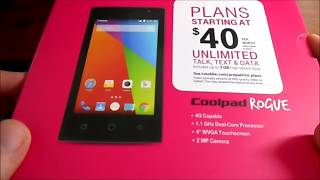
Key specs
Critic consensus

“The Rogue runs Android 5.1.1 Lollipop, which is a relatively recent version of the OS and more than I would expect from a $50 phone. The phone probably won't get any software updates, but Lollipop is a reasonably stable and well-performing build of Android, so you should be OK on it for a while.”
Watch before you decide



What people say
1 community rating · Recommendation data coming soon.
I got this phone as a Temp phone while my phone was in repairs. Its better than the loaner phone Tmobile provided me. I got the phone at walmart for $30 dollars so I didn't expect much from a 30 dollar phone. The internal storage quickly filled up and most of that was just updates to the pre-inst...
What people actually want to know
When was the Coolpad Rogue released?
The Coolpad Rogue was released on September 22, 2015.
How long does the battery last on the Coolpad Rogue?
The Coolpad Rogue has a 1,900 mAh battery.
Does the Coolpad Rogue support wireless charging?
No, the Coolpad Rogue does not support wireless charging.
Does the Coolpad Rogue have a headphone jack?
Yes, the Coolpad Rogue has a 3.5mm headphone jack.
Does the Coolpad Rogue have NFC?
No, the Coolpad Rogue does not have NFC. Contactless payments and tap-to-pair will not be available.
Where can I download the Coolpad Rogue manual?
You can view and download the Coolpad Rogue manual on our dedicated manual page.
Questions & answers
✓ Question submitted. We'll notify you when someone answers.
We sent a verification link to . Click it to publish your question.
Can't find it? Check your spam folder.
Finish the security check above to post your question.
Your name shows with your question.
How it compares


New phones, honest scores.
One email when something worth knowing changes. No deal spam, no filler.
Hi James. Coolpad Defiant and Coolpad Rogue use different batteries. Please only use the official battery for your phone to avoid any problem.