


Asus MeMO Pad
Key specs
Critic consensus

“Don’t let its $150 cost fool you, just because it fulfills that age old adage of “you get what you pay for.” Sure it’s cheap, but there’s good reason for that. Naturally, its outdated specs and low-res display make it extremely obviously, but its molasses slow performance makes the experience extremely unbearable at times – justifying that cheap is cheap. Still, if you’re the kind of person with a lot of patience, you might not mind its arduous performance, but if not, stay far away from this. Somehow, it might end up being thrown across the room due to frustration”

“The ASUS MeMO Pad delivers Android Jelly Bean and expandable memory for a very aggressive price, but you'll sacrifice display quality and performance.”

“At $149 for 16GB of storage, the Asus Memo Pad ME172V is clearly targeted at budget-minded users. However, I think those users would be better served paying more for Asus' (and Google's) current crown jewel, the Nexus 7. There’s no microSD slot on the Nexus 7, but you won’t have problems playing the latest games, either. Also, the Nexus 7’s faster performance and high screen quality more than make up for the extra $50. If you absolutely must go sub-$200, the Kindle Fire (2012) with its 7-inch IPS screen, will easily meet your media consumption needs.”

“That there isn’t anything here to amaze us isn’t a knock on ASUS — for $150, you can’t really expect the world. I know I shouldn’t lead everything off with a “but the price” declaration, but when you consider who and what this device was intended for it really is one of the major factors in determining its worth. I’d be wholly disappointed if I paid upwards of $300 or more for something like this, something that wasn’t all that uncommon back when Android tablets first began to seed into the market.”
Watch before you decide





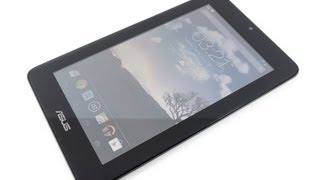





In Depth
Google and Asus may have partnered together to create Google’s Nexus 7 tablet but that didn’t prevent Asus from introducing their own Android tablet. The Asus MeMo Pad is a 7” tablet that has marketed itself as the more affordable version of the Nexus 7. And while it might not stand out from the budget tablet crowd, it does offer smooth basic performance and a solid design.
For consumers who like the look and feel of the Nexus but not the price tag, the MeMo Pad delivers on the aesthetic front. The tablet itself practically has the same dimensions as the Nexus 7 and a similar textured back. But that’s where the similarities end.
Unlike the HD Nexus, the MeMo Pad screen resolution is not HD quality as it maxes out at 1024×600. Most average consumers might not be able to tell the difference, however it is noticeable to people who are used to 720p or 1080p screens. Like most tablets in its class, the MeMo Pad offers a responsive touch screen, WiFi and a forward facing camera for video chat. In addition, the MeMo Pad offers a choice of 8GB or 16GB of onboard storage as well as an expandable micro-SD slot. The VIA WM8950 Single core 1 GHz processor functions smoothly with simple tasks like surfing the internet or checking emails. Unfortunately, it does have issues with graphics or memory intensive apps like games.
Aside from the non-HD screen quality and poor processor speed, another major drawback of the MeMo Pad is its battery life. When used normally, the tablet lasts around three hours. While not horrible, it certainly is not convenient for people who depend on their tablet for updates via email or calendar notices when they are traveling. The tablet also has connectivity issues as it does not allow for bluetooth syncing and the WiFi card only connects to 2.4 GHz bands.
For the price, the MeMo Pad is a decent tablet in its class. While the specs and software cannot rival the Nexus 7” or other premium tablets, the MeMo Pad is still a decent tablet for consumers who simply want to surf the web and listen to some music on the go.
The Good: Expandable micro-SD slot, low price, sleek design and sturdy build.
The Bad: Poor battery life, non-HD screen, poor CPU performance when playing gaming apps.
What people actually want to know
When was the Asus MeMO Pad released?
The Asus MeMO Pad was released on April 9, 2013.
How long does the battery last on the Asus MeMO Pad?
The Asus MeMO Pad has a 16 mAh battery.
Does the Asus MeMO Pad support wireless charging?
No, the Asus MeMO Pad does not support wireless charging.
Does the Asus MeMO Pad have NFC?
No, the Asus MeMO Pad does not have NFC. Contactless payments and tap-to-pair will not be available.
Where can I download the Asus MeMO Pad manual?
You can view and download the Asus MeMO Pad manual on our dedicated manual page.
Questions & answers
Have a question about the Asus MeMO Pad? Ask it here and we'll email you as soon as someone answers. Readers have answered 5,000 questions across PhoneCompass.
Finish the security check above to post your question.
Your name shows with your question.
✓ Question submitted. We'll notify you when someone answers.
We sent a verification link to . Click it to publish your question.
Can't find it? Check your spam folder.
How it compares


New phones, honest scores.
One email when something worth knowing changes. No deal spam, no filler.